As we delve deeper into the hidden realms of your smartphone's settings, we encounter features that, while seemingly innocuous or even beneficial at first glance, can become significant detractors from your device’s efficiency and your personal tranquility. The constant barrage of digital stimuli and the seemingly endless stream of updates often contribute to a feeling of being overwhelmed, rather than empowered, by our technology. It’s a paradox of the digital age: devices designed to connect us and simplify our lives can, through their default configurations, inadvertently create more noise and complexity. Now, we'll explore how to regain serenity and smarter management of the digital deluge that often characterizes our mobile experience.
Mastering the Art of Digital Serenity with Notification Management
Ding! Buzz! Chirp! Our phones have evolved into sophisticated attention-grabbing machines, constantly vying for our focus with a relentless stream of notifications. From social media likes and breaking news alerts to app update reminders and email arrivals, the digital chorus can be deafening. While notifications serve a vital purpose in keeping us informed and connected, an unmanaged notification system quickly transforms into a significant source of distraction, anxiety, and even battery drain. Each notification, whether it lights up your screen, vibrates your pocket, or plays a sound, consumes a small but measurable amount of energy. Multiply that by dozens or even hundreds of notifications throughout the day, and you're looking at a substantial drain on your battery life, not to mention a fragmented attention span that makes deep work or focused concentration nearly impossible.
The psychological impact of notification overload is well-documented. Studies by researchers at Carnegie Mellon University and the University of Texas at Austin have shown that constant phone notifications can impair cognitive performance and increase stress levels, even if you don't actively engage with them. The mere presence of a notification, or the anticipation of one, can divert mental resources away from the task at hand. Moreover, the "fear of missing out" (FOMO) often compels us to check every ping, creating a compulsive cycle that keeps us tethered to our devices. From a purely performance standpoint, every time your screen lights up, your phone's processor wakes up, and its display consumes power, especially if it's an OLED screen displaying bright colors. While a single notification might seem negligible, the cumulative effect over a day or week is anything but, silently eroding both your phone's stamina and your mental clarity.
Reclaiming Your Focus from the Digital Barrage
The default setting for most apps is to push every conceivable notification, often without much thought for the user's actual needs. A game might notify you about "energy restored," a shopping app about a "flash sale," and a news app about a "trending story" – all vying for your attention with equal urgency. This lack of hierarchy or discernment in default notification settings is a major contributor to the problem. The solution isn't to turn off all notifications entirely, which would defeat the purpose of a connected device, but rather to engage in a strategic culling and prioritization. Think of it as curating your digital inbox, allowing only the truly important messages to break through the noise, while relegating less critical updates to a more passive, on-demand status.
"Notifications are a double-edged sword. They can keep us connected, but if uncontrolled, they become constant interruptions that fragment our attention and diminish our productivity. Taking charge of them is a crucial step towards digital wellness." - Cal Newport, Author of 'Digital Minimalism'.
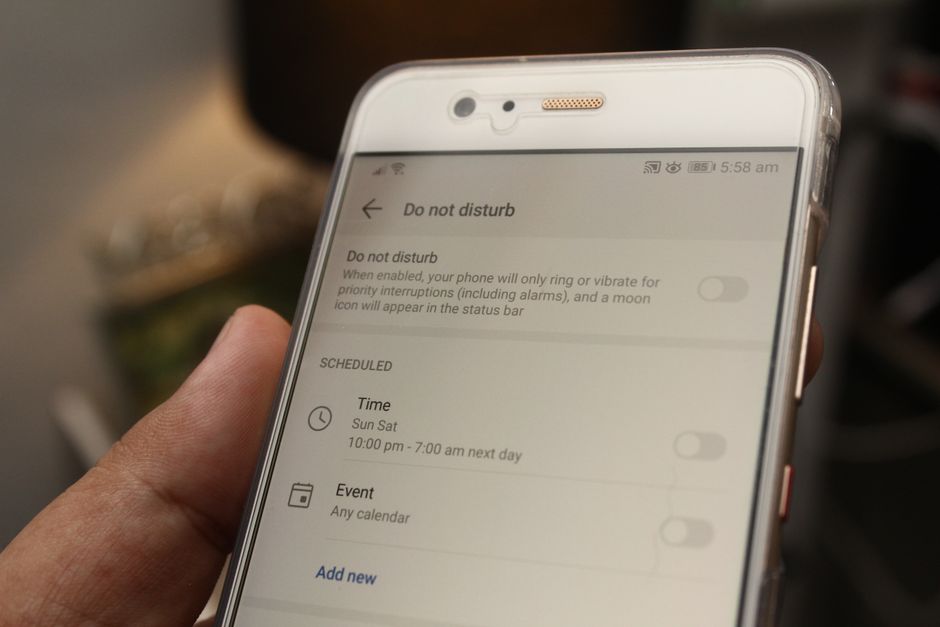
Many operating systems now offer incredibly granular control over notifications, allowing you to silence specific apps, choose notification styles (banners, sounds, badges), group similar notifications, or even schedule "Do Not Disturb" periods. For instance, you might want vibrations and sounds for messages from family, but only silent banners for social media, and no notifications at all for games or shopping apps. By investing a little time in this often-overlooked section of your settings, you can drastically reduce the number of interruptions throughout your day, conserve precious battery life by minimizing screen activations, and ultimately foster a more focused and less anxious relationship with your smartphone. It's about training your phone to serve *you*, rather than allowing it to constantly demand your attention, thereby transforming a source of digital stress into a tool for genuine productivity and connection.
Taking Control of the Update Avalanche for Stability and Savings
Software updates, whether for your operating system or individual applications, are generally a good thing. They bring new features, patch security vulnerabilities, and improve performance. However, the default setting on many phones to automatically download and install these updates can introduce unforeseen problems. While convenient, automatic updates can occur at inconvenient times, consuming significant bandwidth, slowing down your internet connection, and draining your battery during the download and installation process. Imagine your phone suddenly deciding to download a 2GB OS update while you're tethering your laptop to it for an important video conference – the resulting slowdowns and data usage spikes can be frustrating, to say the least. Moreover, sometimes new updates introduce bugs or compatibility issues with existing apps, and having them automatically installed means you might be among the first to experience these problems, without any prior warning or choice.
The data implications are also substantial. A single OS update can range from several hundred megabytes to several gigabytes. If your phone is set to automatically download these over a cellular connection, you could quickly exhaust your monthly data allowance, leading to unexpected charges or throttled speeds. Many users have been caught off guard by a sudden surge in data consumption, only to discover their phone had downloaded a massive update in the background. Beyond data, the installation process itself can be resource-intensive, requiring significant processing power and battery. This can lead to your phone feeling hot, sluggish, and unresponsive for an extended period, especially if the update is happening in the middle of a critical task. While manufacturers usually recommend keeping software updated for security reasons, there's a strong argument to be made for *manual* control over *when* and *how* these updates occur.
Navigating the Security vs. Convenience Conundrum
The core tension here lies between security and user control. On one hand, keeping your software updated is crucial for patching newly discovered vulnerabilities that hackers might exploit. On the other hand, blindly accepting every automatic update means surrendering control over your device's stability and data usage. A more balanced approach involves disabling automatic updates and opting for manual review. This allows you to wait a few days or weeks after an update is released, check online forums or tech news for any reports of major bugs, and then decide when it's most convenient and safest to install it. You can also ensure updates only occur when you're connected to a stable Wi-Fi network, thereby preserving your cellular data and ensuring a smoother download process.
"Automated updates are a double-edged sword. They provide crucial security patches, but they can also introduce unforeseen bugs or consume valuable data at inconvenient times. Intelligent manual control offers the best of both worlds." - Cybersecurity Consultant, Maya Sharma.
Think of it as a quality assurance check before you commit. Case in point: the iOS 13.0 release in 2019 was notoriously buggy, leading Apple to quickly release 13.1, 13.1.1, and 13.1.2 in rapid succession to fix critical issues. Users who had automatic updates enabled likely experienced these problems firsthand, while those who waited could skip the initial problematic versions. The same often applies to Android updates and individual app updates. By taking charge of when your phone updates its software, you gain greater control over your data consumption, avoid potential performance hiccups, and ensure that your device remains stable and reliable. It’s a proactive step towards a more predictable and less frustrating mobile experience, moving away from a passive acceptance of system-level decisions to an active role in managing your device's digital health.